
This guide covers every pricing model, from a simple fixed price to stay tiers for multi-day boarding, and how Petboost works out what a booking costs. All of it is set on a service's Pricing & Payments tab.
Basic pricing
Set a fixed or "from" price
A fixed price is one price for every booking. A "from" price shows customers a starting point, so they expect the final cost may vary.
- Open Services, select Manage on the service, then Manage Service.
- Choose Pricing & Payments.
- Under Service Pricing, enter the Base Price. For a "from" price, this is the starting point.
- For a "from" price, switch on Display as "from" price. Leave it off for a fixed price.
- Select Publish Changes, tick the box in Before You Publish, then select Publish Changes.
With a fixed price, customers see that exact price while they book. With Display as "from" price on, they see "from" and the price.
A fixed price suits services with consistent effort and time, group classes or courses, walk-in services, and services where the pet makes little difference to the cost.
| Service | Base Price |
|---|---|
| Group Dog Walk | $40.00 |
| Half Day Daycare | $90.00 |
| Basic Nail Trim | $15.00 |
A "from" price suits grooming, where the coat's condition varies a lot, services whose final cost depends on what you find during the service, size-dependent prices without separate services, and services with optional add-ons.
| Service | Display | Actual range |
|---|---|---|
| Full Groom (Large) | from $180.00 | $180-$250 |
| Boarding Stay | from $120.00/night | Varies by duration |
| Training Session | from $85.00 | $85-$150 |
To set the final price, change it on the booking's invoice once you have reviewed the work, during or after the appointment. See Change the price on one booking.
Multi-Pet Discount Pricing
Multi-pet rates lower the price per pet when a customer books several pets for the same service. Petboost counts the pets, finds the matching rate, and applies that rate per pet to every pet in the booking. The saving is worked out for display.
Trap
The rate you enter is the price per individual pet, not the total for all pets. Total = rate per pet x number of pets. If you want 2 dogs to cost $150 in total, set the rate per pet to $75, not $150.
Set up multi-pet rates
- Open Services, select Manage on the service, then Manage Service.
- Choose Pricing & Payments and switch on Advanced options.
- Under Multi-Pet Discount Pricing, select Add Rate.
- Set Min Pets and Max Pets, and enter the Per Pet Price.
- Select Add Rate again for each further pet count.
- Select Publish Changes, tick the box in Before You Publish, then select Publish Changes.
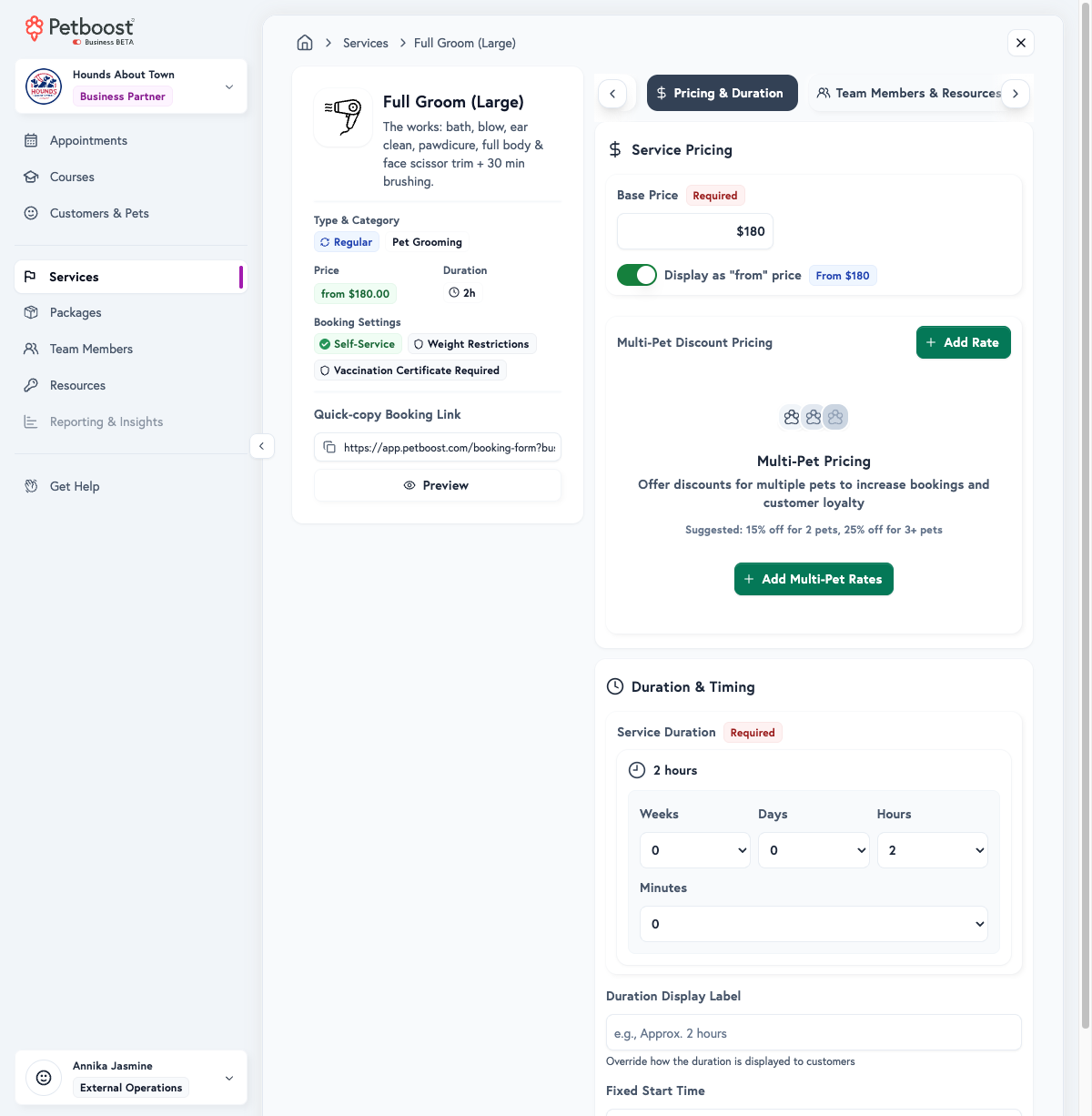
Add Rate stays greyed out until the Base Price is above $0. One pet pays the Base Price. A Stay service sets the same thing under Multi-Pet Discounts with Add Tier.
| Pet count | Rate per pet (example) | Total (example) | Effective discount |
|---|---|---|---|
| 1 pet | $100.00 | $100.00 | 0% (full price) |
| 2 pets | $85.00 each | $170.00 | 15% off |
| 3+ pets | $75.00 each | $225.00 (for 3) | 25% off |
While booking, a customer with two pets sees each pet at $85.00 (multi-pet rate), a total of $170.00 and a saving of $30.00. With three pets, each is $75.00, the total $225.00 and the saving $75.00.
Multi-pet discounts work well for standard grooms and baths, walks with several dogs, training sessions and daycare. They may not suit boarding, where each pet takes a full space and resources, specialised services that need full attention, or medical services.
Stay Pricing (Boarding & Overnight Stays)
Stay pricing is set on the service's Pricing & Payments tab as Pricing Mode.
Choose how each Stay service bills
- Open Services, select Manage on the stay service, then Manage Service.
- Choose Pricing & Payments.
- Under Pricing Mode, choose Duration-based, Number of nights or Number of days.
- Enter the rate: Standard Daily Rate for Duration-based and Number of days, or Rate per night and optionally Daycare rate (same-day stays) for Number of nights.
- Select Publish Changes, tick the box in Before You Publish, then select Publish Changes.
| Pricing Mode | How it bills |
|---|---|
| Duration-based | Total hours from check-in, divided into 24-hour periods. Optional sub-24-hour short-stay and spillover rates. This is the default if you do not pick a mode. |
| Number of nights | Midnights crossed × Rate per night. A same-day visit uses Daycare rate (same-day stays) when one is set, otherwise Rate per night. No short-stay or spillover rates. |
| Number of days | Every calendar date the pet is on site, arrival and departure days both charged. Fri to Mon is 4 × the rate per day. Time of day never changes the price. A same-day stay is 1 day. No short-stay or spillover rates. |
Extended Stay Discounts work on all three modes. A tier gives a longer stay a lower rate, and the tier the whole stay reaches prices every unit of it: every 24-hour period on Duration-based, every night on Number of nights, every day on Number of days. Short-stay and spillover rates apply on Duration-based only.
Duration-based fits irregular check-in and check-out times, billing for actual care time (a 09:00 check-in and a 15:00 check-in pay differently), and short stays priced by sub-24-hour tiers. Number of nights fits fixed check-in and check-out windows where every one-night stay should cost the same whatever the clock says. Number of days fits counting dates on a calendar and charging for every day the pet is with you, the day they go home included.
Understanding the two tier types (24-hour periods)
A Duration-based Stay service uses two separate tier systems that work together. Number of nights and Number of days use the first one only, counting nights or calendar days instead of 24-hour periods (see Extended stay discounts on Number of nights and Number of days).
1. Extended Stay Discounts
Extended Stay Discounts are the rates charged for each complete 24-hour period. When a stay passes a tier's minimum duration, that tier's rate is unlocked and applies to all full 24-hour periods, so a longer stay pays a lower rate for every period.
| Duration range | Per-day rate |
|---|---|
| 1-2 days | $117/day |
| 2-14 days | $73/day |
| 14-21 days | $63/day |
| 21+ days | $56/day |
For a 6-day stay, 6 days unlocks the 2-14 days tier at $73/day, so the stay costs 6 × $73 = $438. The customer pays $73 for each day, not $117 for the first 2 days.
2. Short-Stay & Spillover Rates
Short-stay and spillover rates, on Duration-based only, price short stays under 24 hours, such as extended daycare, and the spillover hours left after full 24-hour periods.
| Duration range | Flat rate |
|---|---|
| 0-4 hours | $40 |
| 4-8 hours | $55 |
| 8-12 hours | $65 |
| 12-24 hours | $73 |
When a stay is, for example, 6 days and 8 hours, the 8 remaining hours need a price. Without spillover rates, those 8 hours are charged at the full daily rate. With them, they are charged at the matching sub-24-hour tier.
Extended stay discounts on Number of nights and Number of days
On Number of nights and Number of days, Extended Stay Discounts count whole nights or whole calendar days. The tier the stay reaches prices every night or day of it, and a stay no tier covers uses the rate per night or per day.
For example, on Number of days with a rate per day of $90:
| Tier | Per day rate |
|---|---|
| 14 to 55 days | $81 |
| 56+ days | $77 |
- A 5-day stay reaches no tier: 5 × $90 = $450
- A 19-day stay reaches the 14 to 55 days tier: 19 × $81 = $1,539
- A 60-day stay reaches the 56+ days tier: 60 × $77 = $4,620
On Number of nights, a same-day visit (0 nights) always uses Daycare rate (same-day stays), or Rate per night when none is set, and never a tier. On Number of days, a same-day stay is 1 day and can reach a 1-day tier.
With several pets and Multi-Pet Discounts, each tier takes the same per-pet discount as the rate. Daycare rate (same-day stays) is never discounted for multi-pet.
Short-stay and spillover rates stay on the service when you switch to Number of nights or Number of days. They price nothing in those modes and apply again if you switch back to Duration-based. Switching Pricing Mode in any direction keeps your Extended Stay Discounts.
Add stay tiers
- Open Services, select Manage on the stay service, then Manage Service.
- Choose Pricing & Payments.
- For a longer-stay discount, select Add Discount Tier under Extended Stay Discounts (Add Tier once the section has one).
- Set From (minimum duration) and To (maximum duration) in weeks and days, and the Per Day Rate or Per Night Rate.
- On Duration-based, for a short stay or spillover rate, select Add Short-Stay Rate under Short-Stay & Spillover Rates (Add Short Tier once the section has one).
- Set From (minimum duration) and To (maximum duration) in hours and minutes, and the Flat Rate.
- Select Publish Changes, tick the box in Before You Publish, then select Publish Changes.
On Duration-based, the tiers sit in Pricing Tiers under your Standard Daily Rate, your rate per 24-hour period and the fallback when no tier matches. The short-stay section reads Short-Stay Rates until the service has an Extended Stay Discounts tier, then Short-Stay & Spillover Rates.
These tiers encourage longer bookings:
| Tier | Min | Max | Rate | Discount |
|---|---|---|---|---|
| Short Stay | 1 day | 2 days | $117 | Base rate |
| Standard | 2 days | 14 days | $73 | ~37% off |
| Extended | 14 days | 21 days | $63 | ~46% off |
| Long-Term | 21 days | 182 days | $56 | ~52% off |
And these handle partial days:
| Tier | Min | Max | Rate |
|---|---|---|---|
| Quick Visit | 0h | 4h | $40 |
| Half Day | 4h | 8h | $55 |
| Extended Day | 8h | 12h | $65 |
| Nearly Full Day | 12h | 23h 59m | $73 |
Trap
Sub-24-hour tiers must have a maximum duration under 24 hours. Petboost stops a tier crossing the 24-hour boundary.
Test a stay price
Pricing Preview, under the tiers on a Duration-based stay service, prices a stay before a customer does.
- Open Services, select Manage on the stay service, then Manage Service.
- Choose Pricing & Payments and select Try it Out under Pricing Preview.
- Set the Stay Duration and the Number of Pets.
- Read the Rate Applied and the Pricing Breakdown.
Complete pricing example
A customer books a stay from Monday 10am to Saturday 6pm: 5 days and 8 hours, or (5 × 24) + 8 = 128 hours. The service has per-day rates of $117 for 1-2 days, $73 for 2-7 days and $63 for 7-14 days, and spillover rates of $40 for 0-4h, $55 for 4-8h and $65 for 8-12h.
- The 5 full 24-hour periods unlock the 2-7 days tier at $73/day: 5 × $73 = $365.
- The 8 spillover hours fall in the 4-8h tier: 1 × $55 = $55.
- The total is $365 + $55 = $420.
The customer sees:
| Boarding Stay (5d 8h) | Amount |
|---|---|
| 5 × 2-7 days period @ $73/day | $365.00 |
| 1 × 4h-8h spillover period | $55.00 |
| Total | $420.00 |
Common stay pricing questions
Can pricing be calculated per night instead of 24-hour periods?
Yes. Set Pricing Mode to Number of nights. Each midnight crossed is charged at Rate per night, and a same-day visit uses Daycare rate (same-day stays) when one is set. Choose Duration-based when check-in and check-out times should change the price: a customer who checks in at 09:00 and out at 18:00 two days later has more care time than someone checking in at 18:00 and out at 09:00.
How do I set up a flat rate per night like traditional boarding?
Set Pricing Mode to Number of nights and enter Rate per night. To give longer stays a lower nightly rate, add Extended Stay Discounts on the same tab. To keep Duration-based billing but charge one flat daily rate, set the Standard Daily Rate to your daily rate, add no per-day tiers (or a single tier covering all durations), and add spillover rates if you want to price partial days. With no tiers, every 24-hour period is charged at the standard rate.
Can I offer a long-stay discount on Number of nights or Number of days?
Yes. Add tiers under Extended Stay Discounts on Pricing & Payments. A "14 to 55 days" tier at $81 on a $90 rate per day prices a 19-day stay at 19 × $81. See Extended stay discounts on Number of nights and Number of days.
What happens if a stay falls between tier boundaries?
Petboost finds the tier whose minimum and maximum contain the whole stay's duration. That tier's rate then applies to all full 24-hour periods, or to every night or day on Number of nights and Number of days. A stay that falls in a gap between tiers uses the standard rate. For example, a 5-day stay with tiers of "1-2 days" and "3-14 days" falls in "3-14 days", and that rate applies to all 5 periods.
Why are some remaining hours charged at a different rate than my spillover tiers?
The spillover hours do not match any sub-24-hour tier. If there is a gap, for example 0-8h and 12-24h but not 8-12h, hours in the gap use the full-day rate instead. Fill every gap in your spillover tiers.
Can I have different check-in and check-out times affect pricing?
Yes, on Duration-based. Petboost works out the exact hours between check-in and check-out, then applies your tiers, so an early check-in or a late check-out means more hours billed.
What if I want to charge my full-day rate for spillover instead of a lower sub-24h rate?
This is a business choice. Some businesses prefer to charge the unlocked per-day rate for spillover hours rather than a lower sub-24-hour rate. Contact Petboost support if you need this billing behaviour configured.
Troubleshooting stay pricing
"My tier pricing isn't working as expected"
- Tier boundaries must be contiguous, with no gaps between minimum and maximum durations.
- Sub-24-hour tiers must be under 24 hours.
- Per-day tiers must be 24 hours or more.
- Tiers must not overlap: each duration should match exactly one tier.
"Customer was charged more than expected"
- Work out the exact hours between check-in and check-out.
- Divide by 24 to get the full periods.
- Check the remaining hours against the spillover tiers.
- Check which tier the total duration unlocked.
Pricing Preview does the same sum for any duration and pet count.
"Migration warning appears for existing tiers"
If Tier Configuration Needs Attention warns that tiers cross the 24-hour boundary, select Fix Automatically to split them into sub-24-hour and per-day tiers.
Stay pricing summary
| Concept | Description | Example |
|---|---|---|
| Standard Daily Rate | Rate per 24-hour period, and the fallback | $117/day |
| Per-day tier | Rate for 24-hour periods by total stay length | "3-14 days @ $73/day" |
| Spillover tier | Rate for remaining hours after full periods | "4-8h @ $55" |
| Tier unlocking | Longer stays unlock better rates for every period | A 5-day stay unlocks the "3-14 day" rate for all 5 days |
| 24-hour period | Unit of billing for full days | 128 hours = 5 full periods + 8h spillover |
Holiday, weekday and special period rates on stays
Public holiday, weekday and date-range rates apply to stays per night, whichever charge method the service bills by. Each night of a stay takes the rate for the date it starts, the checkout date is never charged except on Number of days, where the departure day takes its own date's rate, and a same-day stay takes its own date's rate as one unit. A percentage rate on a multi-night stay is worked out on the average nightly rate for the stay. The amount appears as its own named line in the customer total, separate from the stay price. To set these rates up, see Holiday and weekday pricing.
Duration & Timing
A non-stay service's Service Duration is the time blocked on the schedule: the hands-on time, the usual setup and clean-up within the service, and expected variation. A stay's length comes from its check-in and check-out times, not a fixed value.
Duration shown to customers replaces how the duration is shown with customer-friendly text:
| Default | Custom alternative |
|---|---|
| "2h" | "Approximately 2 hours" |
| "1h 30m" | "2-3 hours depending on coat condition" |
| "Full Day" | "Half day (4-5 hours)" |
Fixed Start Time makes a service start at one set time, such as a group class that always starts at 9:00 AM, a scheduled tour or event, or another fixed-schedule activity. Each service has one fixed start time; for several start times a day, create a separate service for each. See Service Configuration for the steps.
Related guides
- Service Configuration - Complete service setup
- Stay Appointments - Managing boarding bookings
- Booking Availability - When services can be booked
- FAQ - Common questions and troubleshooting
Need help?
If pricing is not working as expected, check your tiers against this guide, look for gaps or overlaps between tier boundaries, work out the expected price with the formulas above or Pricing Preview, then contact Petboost support with the service's configuration and an example booking.